About the Match Coordinate Systems relationship


(Home tab→Assembly group→Match Coordinate Systems  )
)
The Match Coordinate Systems relationship is applied to position parts in an assembly to match the x, y, and z-axes of the base coordinate system or a user-defined coordinate system on the part being placed, with the x, y, and z-axes of a coordinate system on a part already in the assembly. The command bar options for this command can be used to define an offset of the coordinates as a fixed amount, a float, or a specified range of supported movement from a user-specified coordinate system plane (x-y plane, y-z plane, or x-z plane) (for more information, see Using the Match Coordinate Systems command bar).
The usefulness of this relationship highly depends on the implemented design intent for each of the parts that form the relationship. If the coordinate planes for each part are carefully considered during their design with respect to how the part is to be assembled, the application of this relationship could speed the assembly process. Any set of coordinate planes associated with a part can be selected for use in making relationships (see the Coordinate System command for more information about creating additional coordinate systems for a part).
The following image shows how the X, Y, and Z-axes of a placed part are aligned with the coordinates of a part already in the assembly. Three Planar Align relationships are applied to align the parts with the three planes of the coordinate systems for each part.
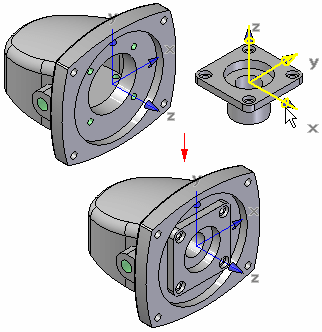
| Position two parts by matching their coordinate systems | Using the Match Coordinate Systems command bar |
© 2021 UDS