Hole command (ordered)


Use the Hole command  to construct one or more holes in the ordered environment. You can use the Hole command to construct simple, threaded, tapered, counterbored, and countersunk holes.
When you select the Hole command, the command bar guides you through the following steps:
| Step 1. | Plane Step—Define the profile plane. |
| Step 2. | Hole Step—Define hole parameters and position one or more hole circles. |
| Step 3. | Extent Step—Define the extent or depth of the holes. |
| Step 4. | Finish Step—Process the input and create the feature. |
You can place holes that pass through more than one body. Use the Body Selection step on the Hole command bar.
Hole patterns
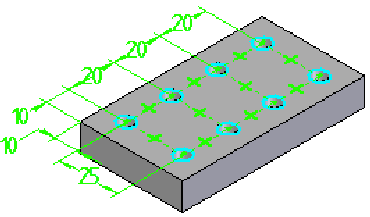
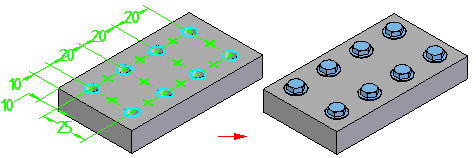
You can place more than one hole circle when constructing hole features. A hole feature with multiple profiles is treated as a user-defined pattern, similar to other pattern features. For example, you can use a user-defined pattern of holes in a part to place an pattern of bolts in an assembly.
© 2021 UDS