Make elements symmetric about an axis


-
Choose the Symmetric command
 .
. -
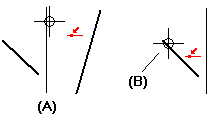
Click an existing line that you want to use as a symmetry axis (A).
 Tip:
Tip:In ordered profile and sketch, you can use the Symmetry Axis command to activate a line to use as a symmetry axis before you select the Symmetry command. If you do, skip this step.
-
Click the first element that you want to make symmetric about the axis. (B)
-
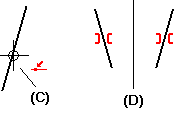
Click another element that you want to make symmetric about the axis (C).
The two elements become symmetrical about the axis (D).
© 2021 UDS